Tekla Online
Support for this feature started in Open iT Core Client version 10.2.
The instructions on this page are for Open iT Core Client version 10.2.610 and later. If you're using earlier versions, please refer to this configuration guide for the appropriate instructions.
Introduction
Open iT supports Tekla Online usage reporting by polling the license servers at regular intervals to get the current status of its license use and availability.
For this collection, the data source is through an API. The data collector/preprocessor initiates the license status utility every hour using a 5-minute sample interval, triggering the data collection process. The license status utility requests the current license usage data from the license manager portal. After the license manager portal provides the requested data, the license status utility passes this information to the data collector/preprocessor. The data collector/preprocessor processes the data, preparing it for transmission. Finally, the preprocessed data is sent to the Core Server at five minutes past every hour (HH:05), according to the client's timezone, for further storage, completing the license usage data collection and processing.
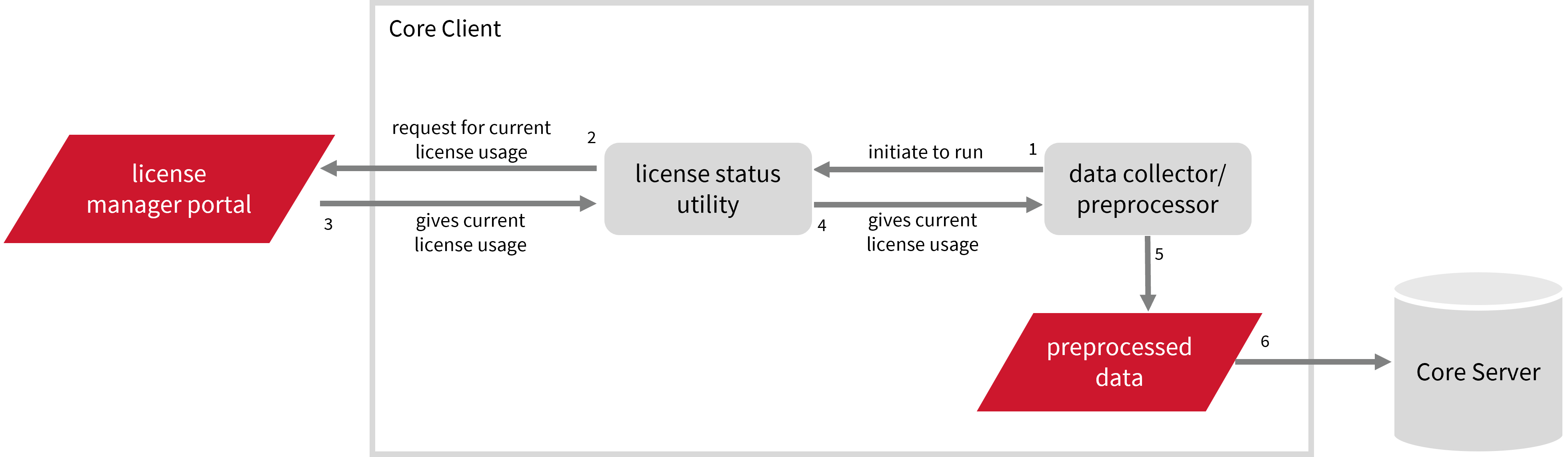
This will produce the following aggregated data types used for real-time and historical reporting:
- (49) Host User License Use
- (93) OLAP Raw Hourly
- (94) OLAP User Concurrency
- (95) Usergroup License Use v3.0
- (102) OLAP Total Use
The following sections will guide you in setting up the necessary configuration to collect and send the required data to the server.
Apply the configurations shown in the Open iT Core Client.
Requirements
- An Open iT Core Client connected to an Open iT Core Server or a coexistent Open iT Core setup
- Activated LicenseAnalyzer collection and license poller
- Non-SSO Tekla Online account with administrator access to the Tekla Online portal, which is https://account.tekla.com/ by default
Setting up Tekla Online Data Collection
These are the required steps to set up data collection from the Tekla Online portal.
- Windows
- Unix
-
Open a command prompt with Administrator level privileges.
-
Go to the bin directory, which is by default in
C:\Program Files\OpeniT\Core\bin, run the command:Command Syntaxcd <bin_dir>Examplecd C:\Program Files\OpeniT\Core\bin -
Set the username and password, run the command:
Command Syntaxgenlicutil2 tekla --confignoteIf you need to collect data from more than one Tekla account, use the
--accountparameter when running this command. This allows you to create separate credentials for each account.Command Syntaxgenlicutil2 tekla --config --account <account_name>where
<account_name>is the name of the account you want to use for data collection.Examplegenlicutil2 tekla --config --account acct1 -
Type in the username (or email) when prompted.
Example: Entering UsernameEnter username to use: john_doe@example.comthen press Enter.
-
Type in the password when prompted.
Example: Entering PasswordEnter password: **********then press Enter.
noteOpen iT saves the hashed Tekla credential file,
Tekla, in the OpeniT directory, which is by default inC:\ProgramData\OpeniT. When you use the--accountparameter, Open iT appends the account name to the credential file (for example,Tekla_acct1). This allows each Tekla account to maintain its own credentials within the same directory. -
Establish the device as trusted using OTP verification, run the command:
Command Syntaxgenlicutil2 tekla --reset-otp -
Enter the one-time password (OTP) sent to the email associated with your Tekla account when prompted.
Example: Entering OTP Verification CodeEnter Verification Code: ******then press Enter.
-
Go to the bin directory, which is by default in
/opt/openit/bin, run the command:Command Syntaxcd <bin_dir>Examplecd /opt/openit/bin -
Set the username and password, run the command:
Command Syntax./genlicutil2 tekla --confignoteIf you need to collect data from more than one Tekla account, use the
--accountparameter when running this command. This allows you to create separate credentials for each account.Command Syntax./genlicutil2 tekla --config --account <account_name>where
<account_name>is the name of the account you want to use for data collection.Example./genlicutil2 tekla --config --account acct1 -
Type in the username (or email) when prompted.
Example: Entering UsernameEnter username to use: john_doe@example.comthen press Enter.
-
Type in the password when prompted.
Enter password: **********then press Enter.
noteOpen iT saves the hashed Tekla credential file,
Tekla, in the openit directory, which is by default in/var/tmp/OpeniT. When you use the--accountparameter, Open iT appends the account name to the credential file (for example,Tekla_acct1). This allows each Tekla account to maintain its own credentials within the same directory. -
Establish the device as trusted using OTP verification, run the command:
Command Syntax./genlicutil2 tekla --reset-otp -
Enter the one-time password (OTP) sent to the email associated with your Tekla account when prompted.
Example: Entering OTP Verification CodeEnter Verification Code: ******then press Enter.
Optional Parameters
| Parameter | Description |
|---|---|
--account <account_name> | Use this to specify the account you want to use for data collection. |
--debug | Use this to turn on debug logging. |
-h, --help | Use this to display the help text. |
Configuring Data Collection
These are the required steps to activate collection of usage data.
- Windows
- Unix
-
Go to the Components directory, which is by default in
C:\Program Files\OpeniT\Core\Configuration\Components, and back up thelicpoll.xmlconfiguration file. -
Open a command prompt with Administrator level privileges.
-
Go to the bin directory, which is by default in
C:\Program Files\OpeniT\Core\bin, run the command:Command Syntaxcd <bin_dir>Examplecd C:\Program Files\OpeniT\Core\bin -
Once in the directory, copy the object node
genericlicense-sampleand rename it to your desired name. In this example, we will usegenericlicense-tekla. Run the command:Command Syntaxopenit_confinit -c "licpoll.license-types.genericlicense-sample=>licpoll.license-types.genericlicense-tekla"warningElement names cannot contain parentheses
(or)because they are not valid for XML element names. -
Activate the collection of Tekla data, run the command:
Command Syntaxopenit_confinit -c "licpoll.license-types.genericlicense-tekla.active=true" -
Set the status command, run the command:
Command Syntaxopenit_confinit -c "licpoll.license-types.genericlicense-tekla.status-command=${OpeniT.directories.bin}/genlicutil2.exe" -
Set the arguments to the status command, run the command:
Command Syntaxopenit_confinit -c "licpoll.license-types.genericlicense-tekla.status-command.arguments=tekla"
If you have multiple Tekla accounts, repeat the configuration steps to create additional object nodes for each account. Use a unique name for every node (for example, genericlicense-tekla1, genericlicense-tekla2, and so on) and specify the corresponding account in the status-command arguments.
openit_confinit -c "licpoll.license-types.genericlicense-tekla1.status-command.arguments=tekla --account acct1"
This ensures that Open iT collects data separately for each configured Tekla account.
-
Run the following command to update the configuration files:
Exampleopenit_confbuilder --clientMake sure no errors are encountered.
Advanced Configuration
Refer to the Tekla Online Data Collection Configuration table to learn more about Tekla Online configuration in licpoll.xml.
| Object Name | Accepted Value | Description |
|---|---|---|
| active | Boolean (true or false) | Setting this to true activates Tekla usage data collection. |
| type | String (i.e., GenericLicense) | The license manager type. |
| interval | Timespan (e.g., P30S, P5M, P1H) | The span of time between each polling round (it is recommended to set a value no less than P1M). |
| offset | Timespan (e.g., P30S, P5M, P1H) | The span of time the aligned poll time decided by interval is shifted. |
| product-name | String (e.g., %host%;teklaonline) | This object is defined if a vendor license name other than the default %host%;teklaonline will be used. |
| license-server | String (e.g., WIN-HOST01) | The license server name. |
| status-command | FileName (i.e., ${OpeniT.directories.bin}/genlicutil2.exe) | The binary used to obtain status from the license manager. |
| status-command.arguments | String (e.g., tekla) | The arguments used for the status command. |
-
Go to the Components directory, which is by default in
/var/opt/openit/etc/Components, and back up thelicpoll.xmlconfiguration file. -
Go to the bin directory, which is by default in
/opt/openit/bin, run the command:Command Syntaxcd <bin_dir>Examplecd /opt/openit/bin -
Once in the directory, copy the object node
genericlicense-sampleand rename it to your desired name. In this example, we will usegenericlicense-tekla. Run the command:Command Syntax./openit_confinit -r /var/opt/openit/ -d /var/opt/openit/etc/ -c "licpoll.license-types.genericlicense-sample=>licpoll.license-types.genericlicense-tekla"warningElement names cannot contain parentheses
(or)because they are not valid for XML element names. -
Activate the collection of Tekla data, run the command:
Command Syntax./openit_confinit -r /var/opt/openit/ -d /var/opt/openit/etc/ -c "licpoll.license-types.genericlicense-tekla.active=true" -
Set the status command, run the command:
Command Syntax./openit_confinit -r /var/opt/openit/ -d /var/opt/openit/etc/ -c "licpoll.license-types.genericlicense-tekla.status-command=${OpeniT.directories.bin}/genlicutil2" -
Set the arguments to the status command, run the command:
Command Syntax./openit_confinit -r /var/opt/openit/ -d /var/opt/openit/etc/ -c "licpoll.license-types.genericlicense-tekla.status-command.arguments=tekla"
If you have multiple Tekla accounts, repeat the configuration steps to create additional object nodes for each account. Use a unique name for every node (for example, genericlicense-tekla1, genericlicense-tekla2, and so on) and specify the corresponding account in the status-command arguments.
./openit_confinit -r /var/opt/openit/ -d /var/opt/openit/etc/ -c "licpoll.license-types.genericlicense-tekla1.status-command.arguments=tekla --account acct1"
This ensures that Open iT collects data separately for each configured Tekla account.
-
Run the following command to update the configuration files:
Example./openit_confbuilder --clientMake sure no errors are encountered.
Advanced Configuration
Refer to the Tekla Online Data Collection Configuration table to learn more about Tekla Online configuration in licpoll.xml.
| Object Name | Accepted Value | Description |
|---|---|---|
| active | Boolean (true or false) | Setting this to true activates Tekla usage data collection. |
| type | String (i.e., GenericLicense) | The license manager type. |
| interval | Timespan (e.g., P30S, P5M, P1H) | The span of time between each polling round (it is recommended to set a value no less than P1M). |
| offset | Timespan (e.g., P30S, P5M, P1H) | The span of time the aligned poll time decided by interval is shifted. |
| product-name | String (e.g., %host%;teklaonline) | This object is defined if a vendor license name other than the default %host%;teklaonline will be used. |
| license-server | String (e.g., host01) | The license server name. |
| status-command | FileName (i.e., ${OpeniT.directories.bin}/genlicutil2) | The binary used to obtain status from the license manager. |
| status-command.arguments | String (e.g., tekla) | The arguments used for the status command. |
Verifying Data Collection
After configuration, you can verify that the data is collected by following these steps:
- Windows
- Unix
-
Open a command prompt with Administrator level privileges.
-
Go to the bin directory, which is by default in
C:\Program Files\OpeniT\Core\bin, run the command:Command Syntaxcd <bin_dir>Examplecd C:\Program Files\OpeniT\Core\bin -
Run the command:
Command Syntaxopenit_licpoll -# 1 -
Verify that the temp directory, which is by default in
C:\ProgramData\OpeniT\Data\temp, contains a LicPoll directory containing.data,status-*.log, andLicpollComplete*.logfiles.noteLicpollComplete*.logfiles are generated after running Licpoll but are not sent to the server by default. To enable the transfer of these logs to the server, follow the instructions on LicpollComplete Log Collection Configuration section.
-
Go to the bin directory, which is by default in
/opt/openit/bin, run the command:Command Syntaxcd <bin_dir>Examplecd /opt/openit/bin -
Run the command:
Command Syntax./openit_licpoll -# 1 -
Verify that the temp directory, which is by default in
/var/opt/openit/temp, contains a LicPoll directory containing.data,status-*.log, andLicpollComplete*.logfiles.noteLicpollComplete*.logfiles are generated after running Licpoll but are not sent to the server by default. To enable the transfer of these logs to the server, follow the instructions on LicpollComplete Log Collection Configuration section.