Installation Verification
Verifying Tables
Once the OpeniT LicenseMonitor is installed in the ServiceNow instance, check if all the necessary tables are created.
-
Log in to the ServiceNow instance with an Administrator account.
-
In the upper-left corner of the page, click All.
-
In the filter option, type
System Definitionto filter the displayed items. -
Go to System Definition > Tables to open the list of all system-defined tables.
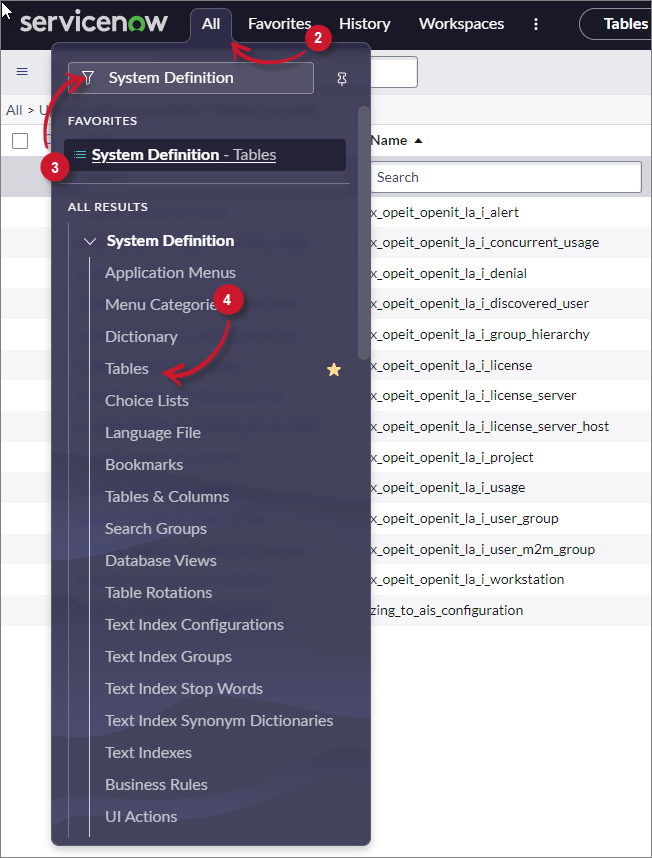 Navigate to System-defined Tables
-
In the search bar, set the criteria to Name, type
x_opeit, and press Enter.Make sure the following tables are available:
- x_opeit_openit_lm_license_server_status
- x_opeit_openit_lm_oitimporttracker
- x_opeit_openit_lm_vendor_license_server_status
Next Steps
If you only require the OpeniT LicenseMonitor, proceed directly to installing the ServiceNow Adapter in your Open iT setup.
If you also plan to use the OpeniT LicenseAnalyzer but have not installed it yet, go to the LicenseAnalyzer installation section before moving on to the ServiceNow Adapter.