Application Settings Configuration for Keycloak - SSO
The Keycloak client values must be configured in the Analysis Server appsettings.config file to enable communication between the registered Keycloak client and the Open iT Analysis Server.
Follow these steps to configure the Analysis Server application settings:
-
Go to the installation directory, which is by default at
C:\Program Files\OpeniT\Analysis Server. -
Open the configuration file
appsettings.configusing any text editor. -
Configure the following keys:
appsettings.config<add key="ida:ClientId" value="" />
<add key="ida:Tenant" value="" />
<add key="ida:AADInstance" value="" />
<add key="ida:PostLogoutRedirectUri" value="" />
<add key="ida:RedirectUri" value="" />
<add key="ida:Domain" value="" />
<add key="ida:TenantId" value="" />
<add key="ida:ClientSecret" value="" />
<add key="ida:UseIdTokenHintForLogout" value="" />Refer to the following table for the value required for each parameter:
Parameter Description ClientIdSpecify the client ID of the registered application. This value is available in Step 8 of the Keycloak Admin Console - Application Registration section. Tenant,Domain, andTenantIdSpecify the name of the Keycloak realm where you registered the Open iT Analysis Server client. For example, if you registered the client in the openit realm, set all three parameters to openit.AADInstanceSpecify the base URL of your Keycloak instance, whether hosted locally or in the cloud. For example: https://keycloak.example.com/realms/.PostLogoutRedirectUriSpecify the post-logout redirect URI of the registered application. This value should match the URL configured in Step 6 of the Keycloak Admin Console - Application Registration section. RedirectUriSpecify the redirect URI of the registered application. This value should match the URL configured in Step 6 of the Keycloak Admin Console - Application Registration section. ClientSecretSpecify the client secret of the registered application. This value is available in Step 9 of the Keycloak Admin Console - Application Registration section. UseIdTokenHintForLogoutSpecify true. Keycloak requires the ID token to be included in the logout request to enable proper single logout behavior.Parameters forappsettings.configExample appsettings.config Configuration<add key="ida:ClientId" value="openit-client" />
<add key="ida:Tenant" value="openit" />
<add key="ida:AADInstance" value="https://keycloak.example.com/realms/" />
<add key="ida:PostLogoutRedirectUri" value="https://as.openit.com:8443/" />
<add key="ida:RedirectUri" value="https://as.openit.com:8443/signin-oidc" />
<add key="ida:Domain" value="openit" />
<add key="ida:TenantId" value="openit" />
<add key="ida:ClientSecret" value="abcd1234-ef56-gh78-zxyz-123456789abc" />
<add key="ida:UseIdTokenHintForLogout" value="true" /> -
Open Internet Information Services (IIS) Manager.
-
In the Connections pane, select Application Pools.
-
Select Open iT Analysis Server Application Pool.
-
In the Actions pane, click Stop.
-
Wait for 10 seconds, then click Start.
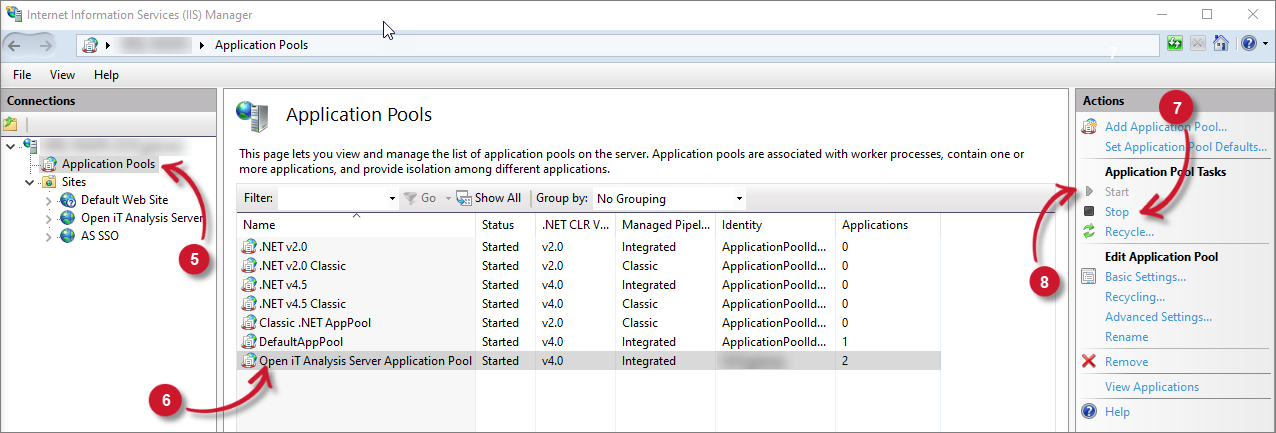
Restart Application Pool