Verifying the OpeniT LicenseMonitor Installation
Use the following guides to verify that the OpeniT LicenseMonitor application is deployed successfully and processing data as expected.
Checking Successful Data Receipt
Verify that all the sent data is received and loaded into the target table.
-
Log in to the ServiceNow instance with an Administrator account.
-
In the upper-left corner of the page, click All.
-
In the filter option, type
System Definitionto filter the displayed items. -
Go to System Definition > Tables to open the list of all system-defined tables.
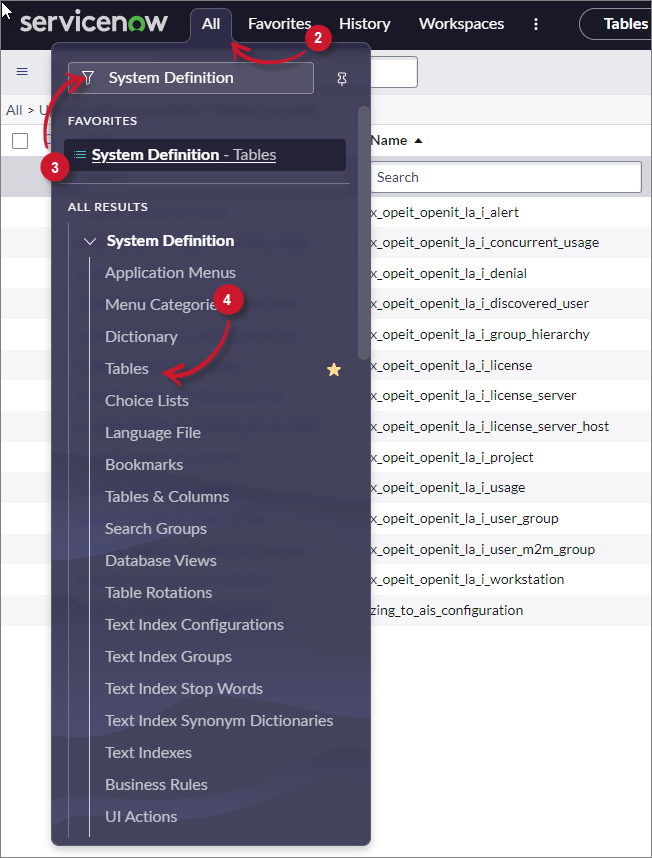 Navigate to System-defined Tables
-
In the search bar, set the criteria to Name, type
x_opeit_openit_lm, and press Enter. -
Choose a table and click its label to open its definition and configuration details.
-
Scroll down to Related Links and click Show List to open the table's data view.
-
Verify that the sent data is already loaded.
Checking Data Receipt Logs
Check the status of all data receipt transactions.
-
Log in to the ServiceNow instance with an Administrator account.
-
In the upper-left corner of the page, click All.
-
In the filter option, type
System Definitionto filter the displayed items. -
Go to System Definition > Tables to open the list of all system-defined tables.
Navigate to System-defined Tables
-
In the search bar, set the criteria to Name, type
x_opeit_openit_lm_oitimporttracker, and press Enter. -
Click Import Tracker to open its definition and configuration.
-
Scroll down to Related Links and click Show List to open the table's data view.
-
Check the State column to monitor the status of the data receipt:
- Loading - data is being loaded
- Completed - data was successfully loaded