General Settings
This tab contains the configuration options to set up the environment for the web interface.
Get the tip for each item in Settings by placing the mouse pointer on the question mark.
Updating the Open iT Server Page Title
-
Go to Administration > Settings > General.
-
Under Server Settings, edit the text in the text box corresponding to Page Title.
-
Click Save.
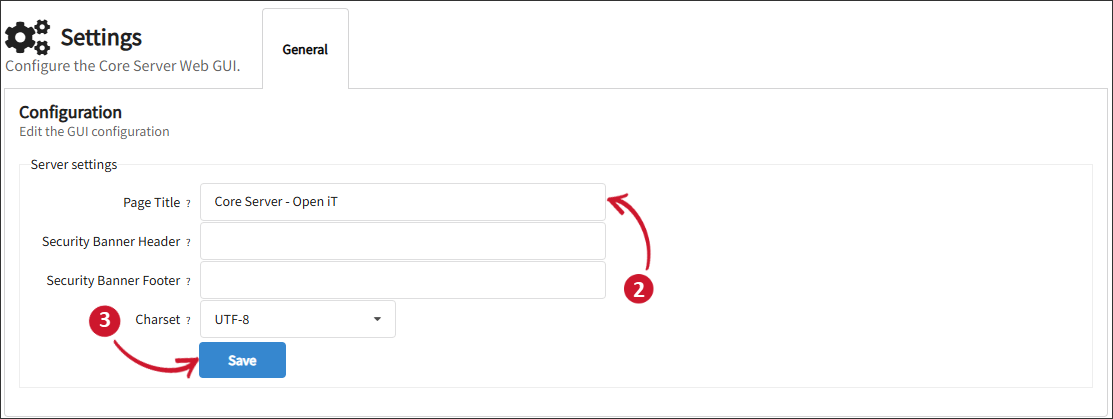 Updating the Open iT Server Page Title
Changing the Security Banner Header and Footer
The LicenseAnalyzer Go interface's floating security banner is a configurable text on top and bottom of each web page to assert ownership and rights, informing the user of the system and what expectation of privacy they should have. The text fields are empty or disabled by default.
Follow these steps to enable the security banner statement as header and footer:
-
Go to Administration > Settings > General.
-
Under Server Settings, edit the text in the text box corresponding to Security Banner Header. Leave the field empty to turn it off.
Under Server Settings, edit the text box in line with the Security Banner Footer. Leave the field empty to turn it off.
-
Click Save.
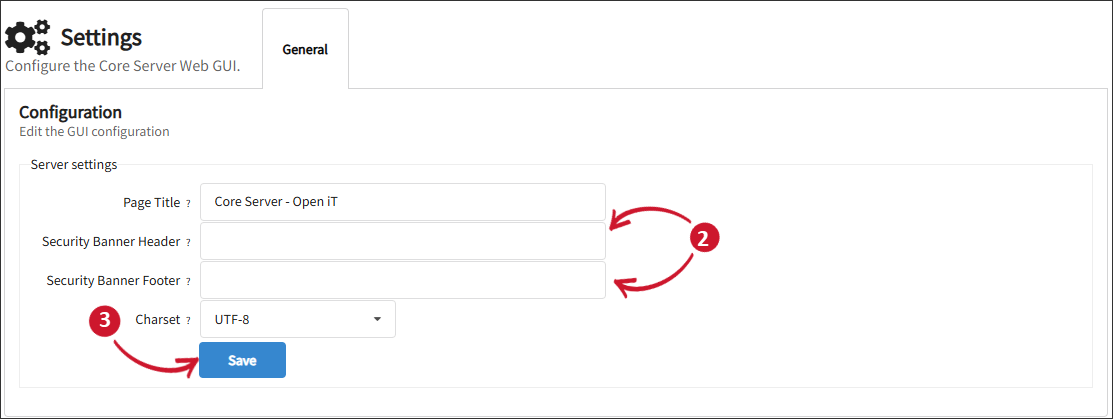 Changing the Security Banners
Specifying the GUI Charset
Selecting a charset does not enable entry of the corresponding characters throughout the Web GUI.
-
Go to Administration > Settings > General.
-
Under Server Settings, select the suitable charset for the data files and real-time data processing.
Charset Description EUC-JP A variable width encoding used to represent the elements of three Japanese character set standards, namely JIS X 0208, JIS X 0212, and JIS X 0201. UTF-8 A variable-length 8-bit (1-byte) Unicode character encoding which is compatible with ASCII encoding. This encoding is very efficient for Western language characters. ISO-8859-1 An 8-bit single-byte coded character set known as "Latin alphabet no. 1," consisting of 191 characters from the Latin script. SJIS A character encoding for the Japanese language based on character sets defined within JIS standards: JIS X 0201:1997 (for single-byte characters) and JIS X 0208:1997 (for double-byte characters). WINDOWS-1251 An 8-bit character encoding designed to cover languages that use the Cyrillic script, such as Russian, Bulgarian, Serbian Cyrillic, and other languages. WINDOWS-1252 An 8-bit character encoding used by Windows for Western European languages. It extends the ISO-8859-1 charset by adding extra symbols and punctuation, commonly appearing in older Windows applications. GUI Charsets
-
Click Save.
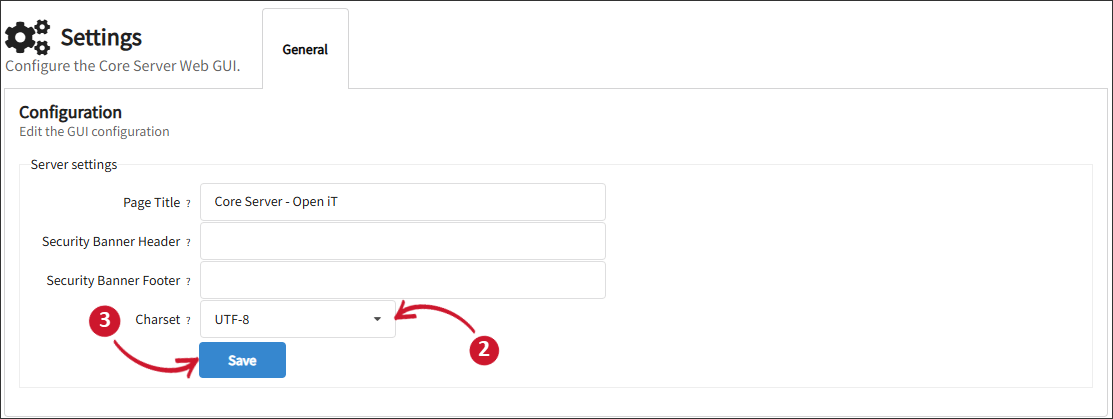 Specifying the GUI Charset