Requirements
Before installing the ServiceNow Adapter, make sure the following requirements are met:
-
Installed and properly configured Open iT Core Server connected to the Open iT Shared Software Assets Directory (SSAD)
- Coordinate with your Open iT Account Manager or the Open iT Support Team at support@openit.com to get your SSAD access credentials.
- The Core Server requires an internet connection to access the SSAD.
noteSSAD access can be configured during Core Server installation or manually set up and activated after installation.
-
Open iT Core Client(s) connected to an Open iT Core Server or a coexistent Open iT Core setup
-
Installed and properly configured Open iT Analysis Server
warningThe ServiceNow Adapter must be installed on the server running the Analysis Server.
noteWe recommend configuring the User Properties mapping in the Analysis Server's Mapping Sources page to make sure that the report displays the user information.
-
Available and properly loaded on Open iT data types on the Analysis Server:
-
Open iT license with a valid
SERVICENOWkey -
ServiceNow login credentials with the following roles:
- sam_eng_app_integrator
- sam_user (minimum required role to access SAM tables)
- query_range_role
- x_opeit_openit_la.openit_integrator
- snc_basic_auth_api_access (required only when using basic authentication)
-
Valid URI of the ServiceNow instance
warningDetermine the compatible Authentication Method for connecting to the ServiceNow instance. If using OAuth2.0, follow the instructions in the Configuring Application Registry in the ServiceNow Instance section.
Additional Requirements for Cloud Data Support
In addition to the requirements listed above, the following data types must be available and properly loaded in the Analysis Server to enable Autodesk and Bentley Cloud data integration, reporting, and insights:
- (89) Total License Use Licenseevents
- (97) OLAP Freeze Raw Hourly
- (139) License Subscription Inventory v2.0
- (140) License Product Assignment v2.0
- (146) License Seat Usage
- (154) OLAP Licenseevents Raw Hourly
Configuring Application Registry in the ServiceNow Instance
When using the OAuth 2.0 authentication method for API communication, you need to create an application registry in the ServiceNow instance.
-
Log in to the ServiceNow instance with an Administrator account.
-
In the upper-left corner of the page, click All.
-
In the filter option, type
Application Registryto filter the displayed items. -
Go to System OAuth > Application Registry to open the list of application registries.
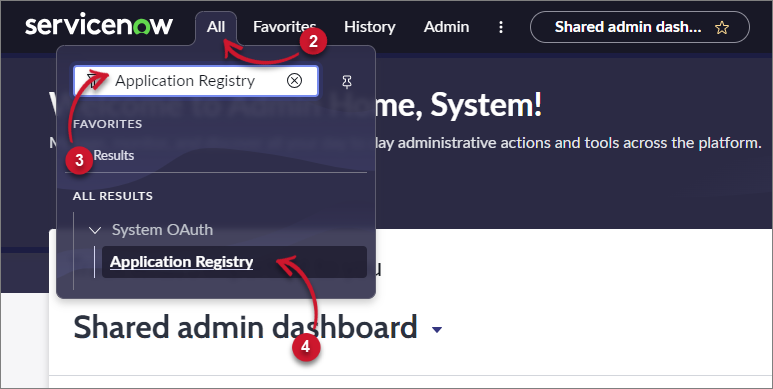 Navigate to Application Registries
-
In the upper-right corner of the page, click New.
-
Click New Inbound Integration Experience.
-
Click New integration.
-
For the application connection type, select OAuth - Authorization code grant.
-
Set a unique Name, for example,
LicenseAnalyzer Registry. -
Set the Redirect URLs to
https://<INSTANCE>.service-now.com/, where<INSTANCE>is the name of your ServiceNow instance. -
Under Scope validation settings in Auth scope, disable the Allow access only to APIs in selected scope setting.
-
Take note of the Client ID and Client Secret that will be used upon installation of the ServiceNow Adapter.
-
Leave all other default values, then click Save.
If the Assign auth scope prompt appears, click Skip for now.