Installation Verification
Verifying Created Directories and Files
Go to the installation directory, which is by default in C:\Program Files\OpeniT\ServiceNow Adapter, and verify that the following directories and files exist:
- bin - contains binary files
- Configuration - contains ServiceNow Adapter configuration files
adapterSettings.config- contains the ServiceNow settings (e.g., Instance URI and credentials)appSettings.config- a symbolic link to Analysis Server'sappSettings.configConnectionStrings.config- a symbolic link to Analysis Server'sConnectionStrings.configprocedures.dimension.yaml- defines the stored procedures that populate dimension tablesprocedures.fact.yaml- defines the stored procedures that populate fact tables
- Log - contains web interface and data processing log files
OpeniT.Adapter.Console.exe- the executable application of the ServiceNow AdapterOpeniT.Adapter.Console.exe.config- the ServiceNow Adapter application configuration file
Verifying the Scheduled Task
Upon installation, a scheduled task is created to execute the daily processing of the ServiceNow Adapter.
-
Open the Task Scheduler in the machine where the ServiceNow Adapter is installed.
-
In the left pane, click Task Scheduler Library.
-
In the list of tasks, verify that OpeniT.Adapter.Console is present and ready.
-
Under the Security Options of the task, SYSTEM should be indicated in When running the task, use the following user account.
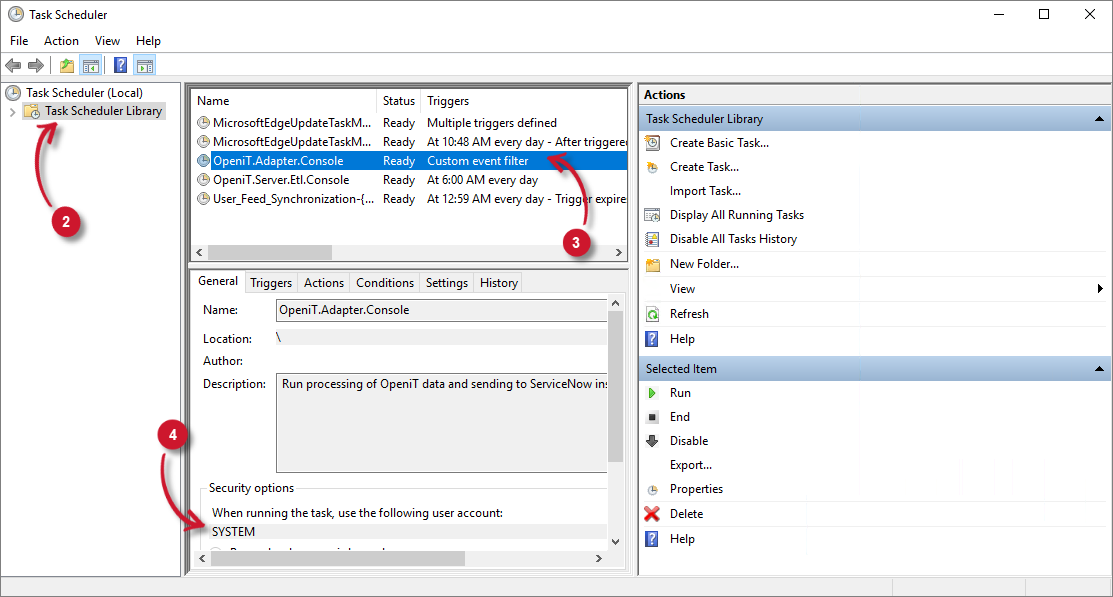
Scheduled Task