This documentation is a work in progress. Additional information will be added as it becomes available.
CloudAnalyzer™
CloudAnalyzer™ is a cloud cost and resource management platform that enables organizations to monitor, analyze, and optimize their cloud environments.
The platform centralizes cloud management tools and information in a single interface, simplifying cloud operations and providing greater visibility into resource utilization and spending.
CloudAnalyzer offers capabilities for resource monitoring, cost analysis, optimization, reporting, and governance. These features help organizations manage cloud resources efficiently, identify cost-saving opportunities, and make informed decisions about their cloud environments.
System Architecture
CloudAnalyzer integrates with supported cloud service providers, including Amazon Web Services (AWS), Microsoft Azure, and Google Cloud Platform (GCP), to collect usage, cost, and resource information from connected cloud accounts. The collected data is made available through the CloudAnalyzer web interface, where users can monitor cloud activities, analyze spending patterns, generate reports, and review optimization opportunities.
The following diagram illustrates the high-level flow of cloud data from connected cloud service providers to CloudAnalyzer's monitoring, reporting, and optimization capabilities.
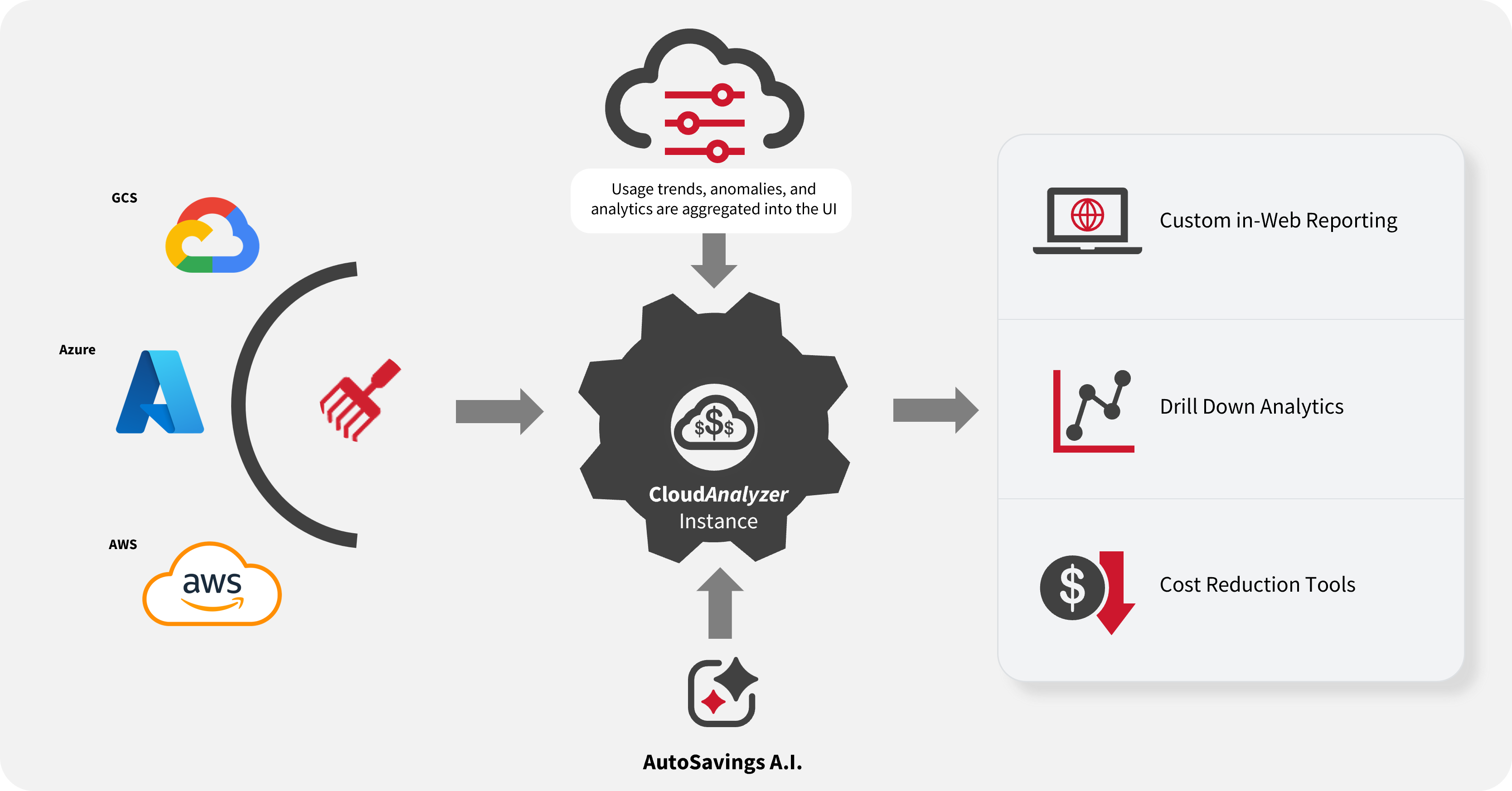
How CloudAnalyzer Works
CloudAnalyzer operates through three main stages: cloud data collection, data analysis and reporting, and cost optimization.
1. Cloud Data Collection
CloudAnalyzer connects to supported cloud service providers through a process called account linking.
Account linking allows CloudAnalyzer to retrieve cloud resource and usage information through the cloud provider's APIs. This enables users to monitor and analyze their cloud environments without requiring direct access to the resources hosted within those environments.
CloudAnalyzer collects the following types of information from connected cloud accounts:
| Category | Collected Information |
|---|---|
| Resource Identification | Account ID, resource name, instance ID, and instance type |
| Resource Location and Configuration | Region, operating system (OS), vCPU count, root volume size, and cluster type |
| Resource Status and Usage | Status, lifecycle, uptime, downtime, and utilization |
| Network Information | Public IP, private IP, and public DNS |
| Resource Metadata | Tags and key pair name |
| Cost Information | Resource costs and total spending |
The collected data is only visible to your organization and cannot be accessed by external parties unless explicitly authorized for support purposes.
The collected information is made available in CloudAnalyzer for resource monitoring, cost analysis, reporting, and optimization.
2. Data Analysis and Reporting
After cloud data is collected, CloudAnalyzer processes and organizes the information for presentation in its web interface.
Users can access the collected information through dashboards and analytical features to:
-
Monitor Cloud Resources: Review resource usage, performance, and operational information across connected cloud accounts.
-
Analyze Cloud Costs: Examine cloud spending, identify usage trends, and detect unusual cost patterns.
-
Generate Reports: Access predefined reports or create custom reports based on specific reporting requirements.
-
Review Optimization Opportunities: Identify opportunities to reduce cloud expenses and improve resource efficiency.
By consolidating cloud data into a single interface, CloudAnalyzer helps users understand cloud consumption and spending patterns across their connected environments.
3. Cost Optimization
CloudAnalyzer uses collected cloud usage and cost information to identify opportunities for reducing cloud expenses.
Through its optimization features, users can review resource optimization recommendations and evaluate cloud commitments, such as Reserved Instances (RIs) and Savings Plans (SPs).
CloudAnalyzer also provides Auto Savings, an optimization capability associated with the AWS and Azure marketplaces, as illustrated in the architecture diagram.
This capability supports automated commitment optimization to help reduce unnecessary costs associated with underutilized commitments.
Accessing CloudAnalyzer Features
Once cloud accounts are connected and the required data is available, users can access CloudAnalyzer's features through the web interface.
The web interface organizes cloud management capabilities into the following main categories:
| Category | Description |
|---|---|
| Overview | Provides a summary of cloud spending, commitment utilization, and resource optimization opportunities. |
| Monitor | Allows users to review cloud resource usage, performance, and related monitoring information. |
| Cost | Provides tools for analyzing cloud spending, monitoring budgets, and identifying cost anomalies. |
| Optimize | Provides resource and commitment optimization features to help identify and manage potential cost savings. |
| Operate | Provides reporting, resource scheduling, and operational management capabilities. |
| Governance | Provides tools for monitoring FinOps performance, managing resource tags, and applying cloud management policies. |